
Hyperliquid Logo and Brand Assets: Official Mark, Brand Teal, Where to Download PNG/SVG and How to Use It (2026)
Hyperliquid logo guide: what the official mark looks like, the brand teal, where to download PNG/SVG brand assets, the HYPE token icon and usage rules (2026).

The Hyperliquid logo is a stylised teal-green mark, read by most people as a flowing wave or abstract "H", set on a dark background next to a clean sans-serif wordmark; the official files and exact colour values come from the Hyper Foundation's brand page at hyperliquid.xyz. Because the mark is reproduced everywhere from exchange listings to meme art, a lot of versions in circulation are slightly off. This guide describes the official Hyperliquid logo and brand assets, where to download PNG and SVG files, what the brand teal is (and why you should copy the exact code from the kit), how the HYPE token icon differs from the wordmark, the PURR mascot, community 3D renders, and the usage rules to respect.
Key takeaways
- The Hyperliquid logo is a teal/mint green mark on dark, paired with a sans-serif wordmark; the official shapes are the ones in the brand kit, not fan redraws.
- Brand colour: a distinctive teal, often quoted around #50E3C2, but take exact hex/RGB values from the official kit before using them.
- Download sources: hyperliquid.xyz / Hyper Foundation brand page, the Hyperliquid GitHub organisation, and the HYPE listing images on CoinGecko and CoinMarketCap.
- The HYPE token icon is the mark in a circular badge; the full logo adds the wordmark.
- PURR is the community cat mascot and the first HIP-1 token, not an official logo.
- Usage rule in one line: do not alter the mark, and do not imply affiliation or endorsement.
What the Hyperliquid logo looks like
Describe the Hyperliquid logo to a designer and you would say: a single-colour geometric mark in teal-green, built from flowing or angled strokes that suggest liquidity and speed and that resolve into something close to a letter "H" or a wave, placed on a near-black or deep-navy field. The wordmark "Hyperliquid" sits to the right or beneath it in a modern sans-serif with even weight and generous letter-spacing.
A few things to note, with the caveat that exact geometry is best confirmed against the official file:
- Single colour. The mark does not use gradients in its primary form; the teal sits flat on dark. Lighter and darker variants exist for light and dark backgrounds.
- No containing shape in the full logo. The circular badge you see on exchanges is a token-icon treatment, not part of the base mark.
- Monochrome versions (white on dark, black on light) are used where colour is unavailable.
- The wordmark is lowercase-feeling in tone even when set in mixed case, matching the app's understated interface.
The identity is deliberately minimal, which fits a project built by a team of around 11 people with no marketing department; more on that in our profile of Jeff Yan and Hyperliquid Labs.
Also searched as: "logo hyperliquid", "hyperliquid png svg", "hyperliquid brand kit".
Hyperliquid colors: the brand teal
Hyperliquid's teal is the most recognisable thing about the brand. It is the colour of the mark, of positive PnL in the app, of the "buy" side and of most ecosystem projects' accent colours.
Community style guides frequently quote a value in the neighbourhood of #50E3C2 (a bright mint-teal), but we deliberately do not present that as the official number. Hex values drift as brands refine their palettes, screenshots pick up colour-management shifts, and the official brand kit may specify slightly different values for screen, print and dark-mode use. Treat "the official brand teal" as the spec and copy the exact hex, RGB and CMYK codes from the kit whenever you are producing anything that will sit next to official material.
What we can say with confidence about the palette:
| Role | Description | Where you see it |
|---|---|---|
| Primary accent | Bright teal / mint green | Logo mark, buy buttons, positive PnL, links |
| Background | Near-black / deep navy | App background, logo field, social banners |
| Text | Off-white | App text, wordmark on dark |
| Negative accent | Red/coral | Sell side, negative PnL |
| Secondary neutrals | Greys | Panels, borders, muted labels |
If you are building an app on HyperEVM and want to look native, the common pattern is dark background, teal accent, white text, and restraint everywhere else.
Where to download official Hyperliquid logo and brand assets
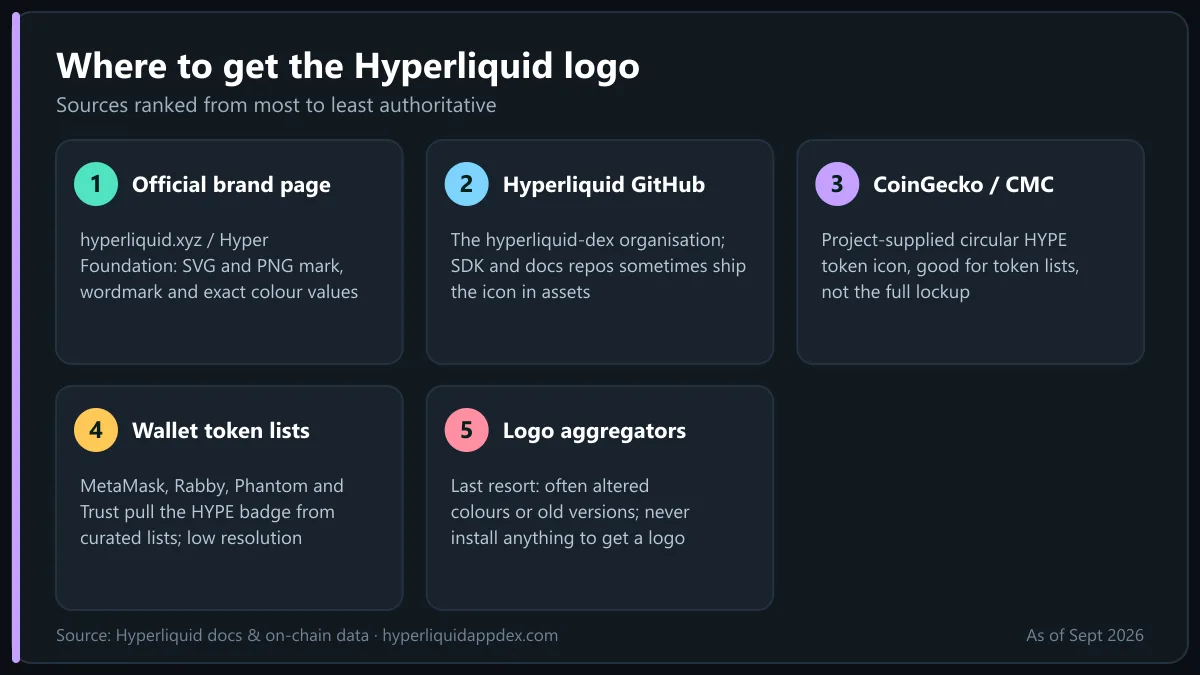
Download order of preference, from most to least authoritative:
- hyperliquid.xyz and the Hyper Foundation brand/media page. The official site hosts the logo, wordmark and icon in SVG and PNG, with the brand guidelines. The Hyper Foundation, which stewards the ecosystem and the HYPE token distribution, maintains the press assets. This is the only source for the exact colour values.
- The Hyperliquid GitHub organisation (hyperliquid-dex). Repositories such as the Python SDK and documentation sometimes include the icon in their assets folders; these are official files, though not always the latest version.
- CoinGecko and CoinMarketCap HYPE listings. The token icon on these pages is supplied by the project and is the standard circular HYPE logo used by wallets and exchanges. Right-click to save the PNG. Good for token lists, not for the full logo lockup.
- Wallet and exchange token lists. MetaMask, Rabby, Phantom, Trust Wallet and major exchanges pull the HYPE icon from curated token lists; these are reliable for the badge but low resolution.
- Logo aggregator sites. Use as a last resort. Many host altered proportions, wrong colours or old versions, and some wrap downloads in adware. Never install anything to get a logo.
Always open an SVG in a text editor before using it: a legitimate logo SVG is a few kilobytes of path data with no embedded scripts.
👉 Open the Hyperliquid app and save 4% on fees
HYPE token logo vs Hyperliquid wordmark
People searching for the "hyperliquid logo" often want one of two different files:
- The HYPE token icon. The teal mark inside a circular badge (sometimes a dark circle with the teal mark, sometimes the inverse). This is what appears next to a balance in a wallet, on a price chart, in a DEX token selector or on CoinGecko. Use it at small sizes where a wordmark would be unreadable.
- The Hyperliquid logo lockup. Mark plus wordmark, used for the platform, the app, the L1 and the brand as a whole. Use it on landing pages, "built on Hyperliquid" badges, presentations and articles.
The relationship mirrors how HYPE the token relates to Hyperliquid the platform: the token inherits the platform's identity, but "HYPE" as a wordmark is rarely used on its own in official material. When in doubt, use the circle icon for the asset and the full lockup for the product.
3D logos, community art and the PURR mascot
Hyperliquid's community has produced an enormous volume of derivative art, and much of what ranks for "hyperliquid 3d logo" is unofficial.
- 3D renders. Glossy, extruded or glass-style versions of the teal mark, often rotated on a dark gradient, appear in YouTube thumbnails, X banners and listing announcements. They are community or exchange-made. They are fine for your own content as long as the underlying mark is not distorted, but they are not part of the official kit.
- Animated logos. Short loops of the mark forming from liquid or light are popular for video intros; again, unofficial unless downloaded from the brand page.
- PURR. The purple cat is Hyperliquid's unofficial mascot and the ticker of the first HIP-1 spot token, which was airdropped to early users. PURR is also, since 2026, the Nasdaq ticker of Hyperliquid Strategies Inc., the HYPE treasury company (see Hyperliquid ETF and stock). The cat imagery belongs to the community; it is not an official Hyperliquid logo and should not be presented as one.
- Hypurr NFTs and ecosystem logos. Projects such as Hypurrscan, HyperDash, Kinetiq, Felix and HyperLend each have their own marks, many of which borrow the teal. They are separate brands.
If you commission or create 3D art, keep the official proportions intact and avoid changing the colour to anything that could be read as a different project.
Usage rules: what you can and cannot do with the Hyperliquid logo
The Hyper Foundation publishes brand guidelines alongside the assets; the current terms on the official site always take precedence over this summary. The consistent principles across crypto brand kits, and Hyperliquid's in particular, are:
Allowed (nominative use):
- Writing about, reviewing or explaining Hyperliquid, as this site does.
- Showing the logo in a list of supported chains, protocols or integrations.
- Linking to app.hyperliquid.xyz with the icon as a button, including referral links that pass on the 4% fee discount described in our Hyperliquid fees guide.
- Using the icon as a token image in a wallet, portfolio tracker or DEX aggregator.
Not allowed:
- Altering the mark: recolouring, stretching, adding effects, rotating, combining it with your own logo into a new mark.
- Implying affiliation, partnership, sponsorship or endorsement by Hyperliquid Labs or the Hyper Foundation.
- Using the logo as the primary identity of your own product, domain or token.
- Presenting a fork, clone or phishing front-end with the official branding.
- Using the wordmark in a way that suggests your content is official.
Practical rule: if a reasonable user might think your page or product is Hyperliquid, you have crossed the line. This site, for example, is an independent guide to the Hyperliquid app DEX and says so.
How to add the HYPE logo to MetaMask (and other wallets)
HYPE exists in two places, which affects how the logo shows up:
- Native HYPE on HyperCore (your trading, spot and staking balance) is displayed inside the Hyperliquid app with the official icon. MetaMask never sees it directly.
- HYPE on HyperEVM is the gas token of the EVM layer, and WHYPE is its wrapped ERC-20 form. This is what MetaMask displays.
To show the logo correctly in MetaMask:
- Add the HyperEVM network (chain id 999, RPC
https://rpc.hyperliquid.xyz/evm, symbol HYPE). The native balance will show with whatever icon MetaMask's network list provides; recent versions include the Hyperliquid icon. - For WHYPE or other HyperEVM tokens, choose Import tokens, paste the contract address, and MetaMask pulls the icon from its token list if the token is listed. If the icon is blank, that is cosmetic and does not affect your funds.
- Rabby, Phantom, OKX Wallet and Trust Wallet resolve icons from their own curated lists and usually show HYPE correctly without manual steps.
Setup for the network itself is in the Hyperliquid app guide, and once the logo shows correctly you can move on to how to trade on Hyperliquid.
Asset types and formats at a glance
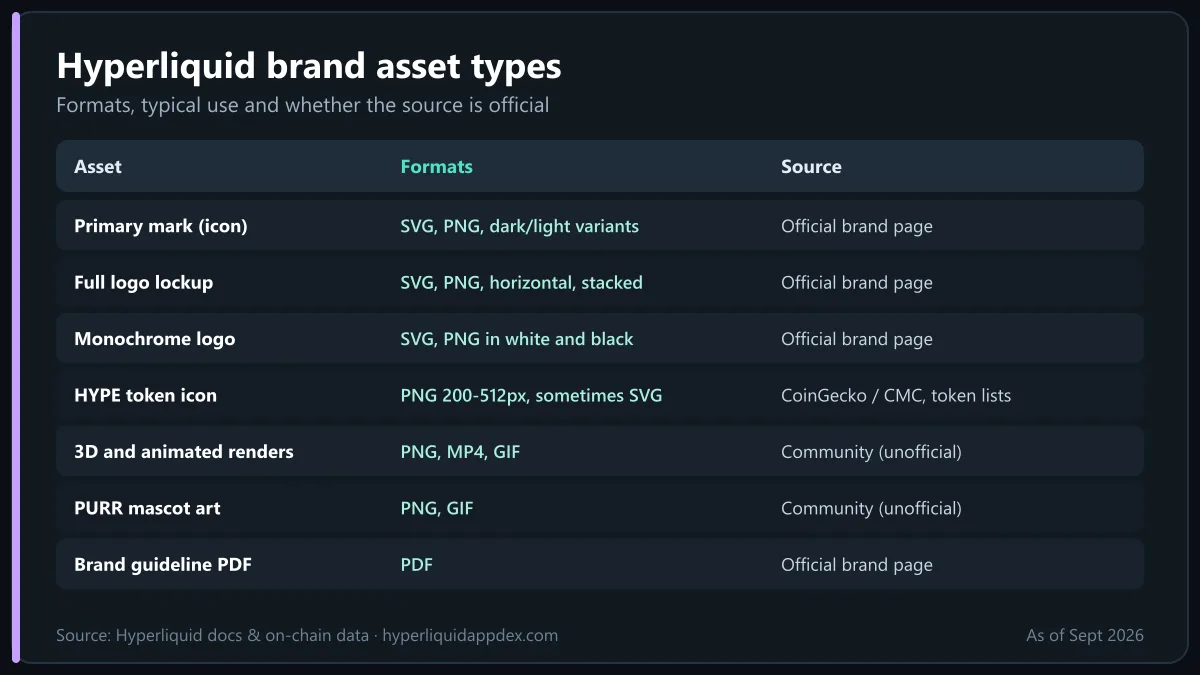
| Asset | Formats you will find | Typical use | Source |
|---|---|---|---|
| Primary mark (icon) | SVG, PNG (transparent), dark/light variants | Favicons, app icons, badges | Official brand page |
| Full logo lockup (mark + wordmark) | SVG, PNG, horizontal and stacked | Headers, "built on Hyperliquid", slides | Official brand page |
| Monochrome logo | SVG, PNG in white and black | Print, single-colour embroidery, overlays | Official brand page |
| HYPE token icon (circular) | PNG 200–512px, sometimes SVG | Wallets, token lists, price pages | CoinGecko / CMC listing, token lists |
| Social banners | JPG/PNG at X and LinkedIn sizes | Profiles, announcements | Official X account, media page |
| 3D and animated renders | PNG, MP4, GIF | Thumbnails, video intros | Community (unofficial) |
| PURR mascot art | PNG, GIF | Community content, NFTs | Community (unofficial) |
| Brand guideline PDF | Colour codes, clear space, do/don't | Official brand page |
For SEO and web use, prefer the SVG where the mark is rendered at variable sizes and a PNG with a transparent background at 2x resolution for raster contexts; keep the file names descriptive (for example hyperliquid-logo.svg) and add alt text that names the brand.
Bottom line
The Hyperliquid logo is a minimalist teal-green mark on dark, paired with a clean wordmark, and the HYPE token icon is that same mark in a circular badge. Download the official PNG and SVG files from hyperliquid.xyz or the Hyper Foundation brand page, use CoinGecko or CoinMarketCap only for the token icon, and copy the exact colour codes from the kit rather than trusting a hex value quoted on a forum. Use the mark unaltered and without implying affiliation, treat 3D renders and PURR art as community work, and you will stay on the right side of the guidelines. For what the brand actually represents, start with what is Hyperliquid and the official docs.
Frequently Asked Questions
What does the Hyperliquid logo look like?
The Hyperliquid logo is a stylised teal-to-mint green mark, often read as a flowing wave or an abstract H, usually shown on a dark navy or black background, paired with the Hyperliquid wordmark in a clean sans-serif. Exact geometry and colour values should be taken from the official brand kit rather than from third-party reproductions.
Where can I download the official Hyperliquid logo?
Start with the official hyperliquid.xyz site and the Hyper Foundation's brand or media page, which host the mark and wordmark in PNG and SVG. The Hyperliquid GitHub organisation and the HYPE listing pages on CoinGecko and CoinMarketCap carry the token icon. Avoid random logo aggregator sites, which often host altered or outdated files.
What is the Hyperliquid brand colour?
The brand is built around a distinctive teal / mint green on dark backgrounds. Community references often cite a hex value in the neighbourhood of #50E3C2, but the only authoritative values are those in the official brand kit, so copy the hex, RGB or CMYK codes from there for any design work.
Is the HYPE token logo the same as the Hyperliquid logo?
They are closely related. The HYPE token icon is the Hyperliquid mark in a circular badge, which is what you see on exchanges, wallets and CoinGecko. The full Hyperliquid logo adds the wordmark. Use the circular icon for token lists and the full lockup for anything that refers to the platform.
Can I use the Hyperliquid logo on my website or product?
Generally yes for nominative use, such as writing about Hyperliquid, listing it as a supported protocol or linking to the app, as long as you do not alter the mark, imply endorsement or partnership, or present yourself as the official project. Check the brand guidelines on the official site for the current terms.
How do I add the HYPE logo to MetaMask?
On HyperEVM, import HYPE (or WHYPE) as a token: open MetaMask on the Hyperliquid network, choose Import tokens, paste the contract address and MetaMask will usually fetch the icon from its token list. If it does not, the icon can be set from the CoinGecko listing image. Native HYPE on HyperCore is shown by the Hyperliquid app itself, not by MetaMask.

Trading on Hyperliquid since the 2024 points seasons. Follow on X · LinkedIn · YouTube
Ready to trade on the Hyperliquid app?
Open the official Hyperliquid DEX with our referral link and get a lifetime 4% discount on trading fees. No KYC, no gas fees, self-custody.
Open Hyperliquid App · Save 4%Disclaimer: This article is for educational purposes only and is not financial, investment or legal advice. Perpetual futures trading with leverage carries a high risk of loss. Read our full disclaimer.