
Best Hyperliquid Wallet in 2026: MetaMask, Rabby, Phantom, Ledger, Coinbase Wallet and More Compared
Hyperliquid wallet guide: the best wallets for Hyperliquid in 2026 (MetaMask, Rabby, Phantom, Ledger, OKX), how to connect each, API wallets and security tips.

The best Hyperliquid wallet for most people is Rabby or MetaMask with a Ledger behind it for anything serious; Phantom is the pick for Solana-native users and now trades Hyperliquid perps inside the app itself. Hyperliquid is an EVM-address chain, so any wallet that can sign Ethereum messages works, but they differ in HyperEVM support, hardware integration, mobile experience and how clearly they show you what you are signing. This guide compares every major Hyperliquid wallet in 2026, shows how to connect each one, explains API wallets and agent keys, and ends with security tips and a simple "which wallet for which user" recommendation.
Key takeaways
- Any EVM wallet can log in to the Hyperliquid app DEX: MetaMask, Rabby, Phantom, Coinbase Wallet, OKX Wallet, Trust Wallet, Zerion, plus WalletConnect.
- Rabby is the power-user choice (signature previews, native HyperEVM, Ledger support); MetaMask is the universal default.
- Ledger works through MetaMask or Rabby; only deposits, withdrawals and agent approvals need the device.
- Phantom has built-in Hyperliquid perps via builder codes and is the best bridge from Solana.
- Email login (Privy) is the fastest start but weakest custody; use it for small balances only.
- Trades are signed by an API wallet (agent key) that cannot withdraw, which is why trading feels gasless and click-free.
How a Hyperliquid wallet actually works
Before comparing products, it helps to know what the wallet does on Hyperliquid, because it is less than on most chains:
- Login and identity. Your EVM address is your Hyperliquid account. There is no sign-up and no KYC; connecting the wallet and signing a message creates the account.
- Deposits and withdrawals. USDC arrives through the native Arbitrum bridge (or BTC/ETH/SOL through Unit, or third-party bridges). Your wallet signs those on-chain transactions. Withdrawals back to Arbitrum cost about $1 and take three to five minutes. Routes are detailed in the bridge and deposit guide.
- Trading. On first use the app asks you to approve an agent (API wallet), a key stored in your browser that signs orders without wallet pop-ups. That key can trade but never withdraw, which is why you can place hundreds of orders without touching MetaMask again and pay no gas.
- HyperEVM. If you use DeFi on HyperEVM (chain id 999), the wallet behaves like it does on any EVM chain, paying gas in HYPE.
So the wallet matters most at the custody layer (seed phrase, hardware support), the deposit layer (bridges, chains) and the EVM layer (network support, signature clarity), not for the trading itself.
Wallet comparison table
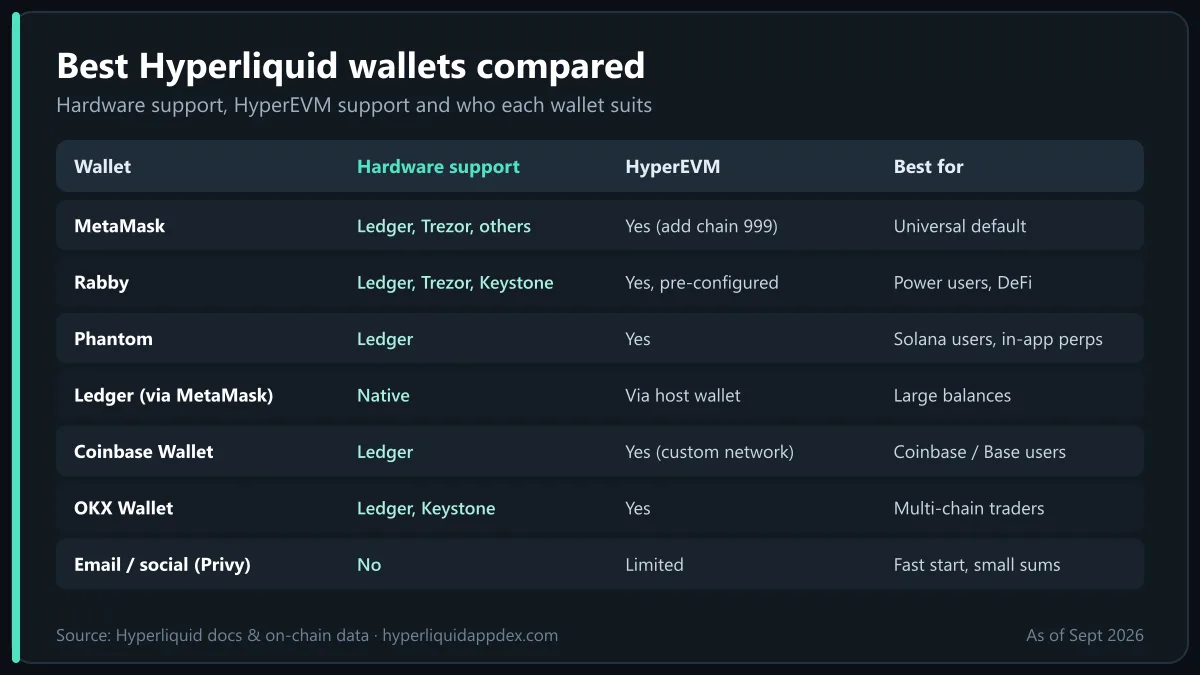
| Wallet | Type | Chains covered | Hardware support | HyperEVM support | Mobile app | Best for |
|---|---|---|---|---|---|---|
| MetaMask | Browser ext. + mobile | EVM (all) | Ledger, Trezor, others | Yes (add chain 999) | iOS/Android, in-app browser | Everyone; universal default |
| Rabby | Browser ext. + mobile | EVM (all), pre-listed chains | Ledger, Trezor, Keystone, GridPlus | Yes, pre-configured | iOS/Android | Power users, DeFi on HyperEVM |
| Phantom | Browser ext. + mobile | Solana, EVM, Bitcoin, Sui | Ledger | Yes | iOS/Android, built-in HL perps | Solana users, mobile perps |
| Ledger (via MetaMask/Rabby) | Hardware | Via host wallet | Native | Via host wallet | Ledger Live + host app | Large balances |
| Coinbase Wallet | Browser ext. + mobile | EVM, Solana, Bitcoin | Ledger | Yes (custom network) | iOS/Android | Coinbase users bridging from Base |
| OKX Wallet | Browser ext. + mobile | 100+ chains | Ledger, Keystone | Yes | iOS/Android | Multi-chain traders, Asia users |
| Trust Wallet | Browser ext. + mobile | 100+ chains | Ledger (limited) | Yes (custom network) | iOS/Android | Mobile-first beginners |
| Zerion | Browser ext. + mobile | EVM, Solana | Ledger | Yes | iOS/Android | Portfolio tracking across chains |
| Email / social (Privy) | Embedded | n/a | No | Limited | Via Hyperliquid app | Fastest onboarding, small sums |
| Hyperliquid native app | Mobile app | n/a (uses your wallet / email) | Via WalletConnect | n/a | iOS/Android | Trading on the go |
Details are as of September 2026; wallet feature sets change frequently.
MetaMask: the default Hyperliquid wallet
MetaMask is the wallet most Hyperliquid users start with because it is the one they already have.
Strengths: ubiquitous, supports every hardware wallet, mature mobile app with an in-app browser that can open app.hyperliquid.xyz, and Arbitrum USDC deposits work with no setup.
Weaknesses: signature requests are shown as raw data, so it is easy to approve something you do not understand; HyperEVM must be added manually; the extension is the most phished wallet in crypto.
How to connect: open app.hyperliquid.xyz, click Connect, choose MetaMask, approve the connection, sign the "Enable trading" message (this creates your agent key), and deposit USDC via the Arbitrum bridge. To add HyperEVM: Settings → Networks → Add network: name Hyperliquid, RPC https://rpc.hyperliquid.xyz/evm, chain id 999, symbol HYPE.
Rabby: recommended for power users
Rabby, built by the DeBank team, is the wallet we recommend to anyone who trades on Hyperliquid daily or uses HyperEVM DeFi.
Strengths: every transaction and signature is simulated and explained in plain language before you approve, which neutralises most phishing; HyperEVM is pre-configured; it supports Ledger, Trezor, Keystone and GridPlus; it shows your approvals and lets you revoke them; and it can import a MetaMask seed so switching is painless.
Weaknesses: smaller mobile user base than MetaMask; a few niche dApps still detect it as MetaMask and behave oddly.
How to connect: install Rabby, import or create a wallet, open app.hyperliquid.xyz and pick Rabby (or "MetaMask" if the site lists only that; Rabby intercepts the request). Approve the connection, sign the enable message, deposit. Rabby's pre-sign preview will show "sign message" with the Hyperliquid domain, which is what you expect.
Phantom: Solana users and built-in Hyperliquid perps
Phantom started on Solana and now supports EVM, Bitcoin and Sui. Two things make it notable for Hyperliquid:
- Built-in perps. Phantom integrated Hyperliquid perpetual futures directly into its mobile and extension UI, using Hyperliquid builder codes. You can open and close perp positions from the Phantom app without ever visiting the Hyperliquid website. Phantom charges a small builder fee per order on top of Hyperliquid's base fees (see trading bots and builder codes for how builder fees work).
- SOL on-ramp. Solana users can bridge SOL or USDC to Hyperliquid through Unit or a third-party bridge straight from Phantom.
Strengths: polished mobile experience, Ledger support, built-in perps for quick trades.
Weaknesses: the in-app perps interface is simpler than the full Hyperliquid app (fewer order types, no vaults or spot); builder fees add cost.
How to connect: either use Phantom's own Perps tab, or open app.hyperliquid.xyz, choose Phantom under EVM wallets, and proceed as with MetaMask.
👉 Open the Hyperliquid app and save 4% on fees
Ledger: hardware security through MetaMask or Rabby
There is no standalone Ledger app for Hyperliquid; you use a Ledger as the signer behind a software wallet. This is the right setup for any balance you would be upset to lose.
How it works on Hyperliquid: connect the Ledger to Rabby or MetaMask (Ethereum app open on the device), connect that wallet to app.hyperliquid.xyz, and approve the "Enable trading" agent key with a device confirmation. From then on, orders are signed by the agent key and need no device interaction. You confirm on the Ledger only for deposits, withdrawals, transfers out, and when you approve a new agent or builder fee. Enable "blind signing" in the Ethereum app if a signature is rejected.
Strengths: private key never leaves the device; the agent-key design means hardware security without hardware friction.
Weaknesses: the agent key in your browser can still trade (but not withdraw) if your machine is compromised, so clear it on shared computers; Ledger plus MetaMask on mobile is clunky, Rabby mobile is better.
Coinbase Wallet, OKX Wallet, Trust Wallet and Zerion
All four work with Hyperliquid as standard EVM wallets. Where they fit:
- Coinbase Wallet: the natural choice if you hold funds on Coinbase or Base. Withdraw USDC from Coinbase to Arbitrum (or to Base and bridge via a third-party bridge), then connect at the Hyperliquid app. Add HyperEVM as a custom network for EVM activity.
- OKX Wallet: strong multi-chain support, built-in bridge aggregator and a large user base in Asia. It lists HyperEVM natively and supports Ledger and Keystone. The OKX exchange also lists HYPE, so it is a convenient on-ramp.
- Trust Wallet: mobile-first and beginner-friendly, with a dApp browser that opens the Hyperliquid app. HyperEVM needs to be added as a custom network. Hardware support is limited, so it is best for smaller balances.
- Zerion: a portfolio-first wallet that shows your holdings across chains, which makes it a lightweight wallet analysis tool. Connect to Hyperliquid as an EVM wallet; note that HyperCore positions (perps, spot balances) are not shown by Zerion because they live off the EVM, so pair it with an explorer for the full picture.
Connection steps are identical for all four: Connect → pick the wallet (or WalletConnect) → sign the enable message → deposit.
Email and social login (Privy)
The Hyperliquid app offers email, Google and other social logins powered by Privy, which creates an embedded wallet for you. It is the fastest way to try the exchange and works well for the native mobile app.
Trade-offs: you do not manage a seed phrase, recovery depends on your email account, exporting the key is possible but not obvious, and you cannot pair a hardware device. Use it for a test deposit or a small trading balance, and migrate to a self-custody wallet before scaling up. The internal transfer between Hyperliquid addresses is free, so moving later costs nothing.
Mobile wallets and the Hyperliquid app
For trading on a phone you have three paths:
- The native Hyperliquid app (iOS and Android), which logs in via email or by connecting a mobile wallet through WalletConnect. It is the full exchange, including vaults, spot and HIP-3 markets; setup is in the Hyperliquid app guide.
- A mobile wallet's in-app browser (MetaMask, Rabby, Phantom, Trust, OKX) opening app.hyperliquid.xyz. Works, but the browser-in-wallet experience is slower.
- Third-party Hyperliquid front-ends such as Lootbase, Dexari or Liquid, and Phantom's built-in perps, which wrap Hyperliquid in a simpler interface with a builder fee.
Whatever you use on mobile, make sure the agent key approval comes from the same address you deposit to, and never type a seed phrase into a mobile browser.
API wallets and agent keys explained
The agent key is the piece most guides skip, and it is the thing that makes Hyperliquid wallets feel different.
- When you click Enable trading, the app generates a fresh key pair in your browser and asks your main wallet to sign a message authorising it as an agent. The agent can place and cancel orders and manage positions for your account; it cannot withdraw or transfer funds out.
- The same mechanism powers bots: in the app's API section you can generate named API wallets, set an expiry, and use their private keys with the official Python SDK or a trading terminal. Details and endpoints are in the Hyperliquid API guide.
- You can revoke any agent at any time from the same screen, and you should when you stop using a device or a bot.
- Because the main wallet is only touched for deposits, withdrawals and approvals, a hardware wallet behind MetaMask or Rabby is the ideal pairing.
Security tips for Hyperliquid wallets
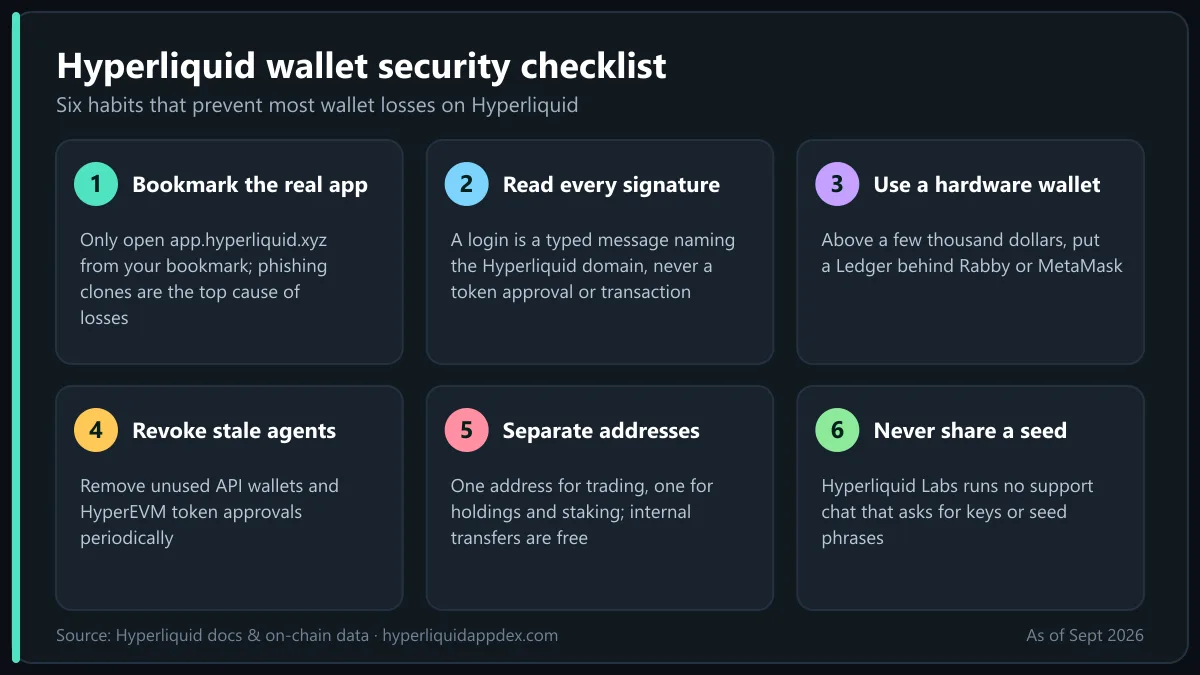
- Bookmark app.hyperliquid.xyz and only use that bookmark. Phishing clones of the app, the explorer and "referral" pages are the most common way people lose funds; see is Hyperliquid safe?.
- Read the signature request. A legitimate Hyperliquid login signs a typed message naming the Hyperliquid domain. If a site asks for a token approval or a transaction when you expect a login, close it. Rabby's previews make this obvious.
- Use a hardware wallet above a few thousand dollars, and a dedicated browser profile for trading.
- Revoke stale agents and HyperEVM token approvals periodically (Rabby and EVM explorers show them).
- Separate addresses by purpose: one for trading, one for long-term holdings and staking. Internal transfers are free.
- Never share a seed phrase with "support". Hyperliquid Labs does not run support chats that ask for keys.
- Check the referral code before the first trade if you want the 4% fee discount; it binds to the address and cannot be added later. Fee details are in the Hyperliquid fees guide.
Which wallet for which user
| You are… | Use | Why |
|---|---|---|
| New to crypto, small test balance | Email login or Trust Wallet | Fastest start; upgrade later |
| Already on MetaMask | MetaMask (add HyperEVM) | Zero learning curve |
| Active trader or HyperEVM DeFi user | Rabby | Signature previews, native chain support |
| Holding a meaningful balance | Ledger + Rabby or MetaMask | Hardware custody with agent-key convenience |
| Solana native | Phantom | SOL on-ramp, built-in HL perps |
| Multi-chain, Asia-based | OKX Wallet | Bridge aggregator, HYPE listing |
| Coinbase / Base user | Coinbase Wallet | Simple USDC path |
| Tracking many wallets | Zerion + an explorer | EVM analysis plus HyperCore positions |
| Trading mostly on a phone | Native Hyperliquid app | Full feature set, no browser |
Bottom line
A Hyperliquid wallet only needs to sign an EVM login, move USDC over a bridge and, if you use HyperEVM, support chain id 999, so the choice comes down to custody and clarity. Rabby is the best wallet for Hyperliquid power users, MetaMask the universal default, Phantom the pick for Solana traders and in-app perps, and a Ledger through either software wallet the right answer for large balances; email login is for trying things out. Whichever you pick, bookmark the real app, read your signature prompts, revoke unused agent keys and keep withdrawals on a hardware device. Then follow how to trade on Hyperliquid to put the wallet to work, and consult the official docs for the latest supported-wallet list.
Frequently Asked Questions
Which wallet is best for Hyperliquid?
For most traders Rabby is the best Hyperliquid wallet: it previews every signature, supports HyperEVM natively and pairs with Ledger. MetaMask is the safest default if you already use it, Phantom is best for Solana users and adds built-in Hyperliquid perps, and a Ledger connected through Rabby or MetaMask is best for large balances.
Does Hyperliquid work with MetaMask?
Yes. Connect MetaMask at app.hyperliquid.xyz, sign the one-time enable message, and trade. For deposits you bridge USDC from Arbitrum, which MetaMask supports out of the box. To see HyperEVM balances add the network manually with chain id 999 and RPC https://rpc.hyperliquid.xyz/evm.
Can I use a Ledger with Hyperliquid?
Yes, through MetaMask or Rabby. Connect the Ledger to the software wallet, then connect that wallet to Hyperliquid. Orders are signed by an API wallet (agent key) you authorise once with the Ledger, so you are not pressing buttons on the device for every trade; only deposits, withdrawals and agent approvals need a hardware confirmation.
Can I trade Hyperliquid inside Phantom?
Yes. Phantom integrated Hyperliquid perpetuals directly into its wallet using Hyperliquid builder codes, so you can open perp positions from the Phantom app without visiting the Hyperliquid website. Phantom adds a small builder fee per order. You can also connect Phantom to app.hyperliquid.xyz as an ordinary EVM wallet.
What is a Hyperliquid API wallet or agent key?
An API wallet (agent) is a secondary key that your main wallet authorises to sign orders on its behalf. It can trade but cannot withdraw. The Hyperliquid app creates one automatically when you enable trading, which is why you do not confirm every order in your wallet; bots and terminals use the same mechanism with keys you generate in the API settings.
Is the email login on Hyperliquid safe?
Email login uses Privy to create an embedded wallet tied to your email or social account. It is convenient and fine for small balances, but you do not hold the seed phrase in the usual way, and account recovery depends on the email provider. For larger sums, use a self-custody wallet and ideally a hardware device.

Trading on Hyperliquid since the 2024 points seasons. Follow on X · LinkedIn · YouTube
Ready to trade on the Hyperliquid app?
Open the official Hyperliquid DEX with our referral link and get a lifetime 4% discount on trading fees. No KYC, no gas fees, self-custody.
Open Hyperliquid App · Save 4%Disclaimer: This article is for educational purposes only and is not financial, investment or legal advice. Perpetual futures trading with leverage carries a high risk of loss. Read our full disclaimer.