
Hyperliquid Explorer Guide: Official Explorer, HyperScan, Hypurrscan, HyperEVM Explorers and Analytics Dashboards (2026)
Hyperliquid explorer guide: official explorer, HyperScan, Hypurrscan and HyperEVM explorers, how to look up wallets, txs, vaults and tokens (2026).

The Hyperliquid explorer you need depends on the layer: the official app explorer at app.hyperliquid.xyz/explorer, HyperScan and Hypurrscan cover HyperCore (perps, spot, vaults, staking), while Blockscout-style explorers such as hyperevmscan cover HyperEVM smart contracts. Hyperliquid runs one chain with two execution environments, so a trade shows up in a HyperCore block and a token transfer in an EVM block, and no single tool shows both perfectly. This guide walks through every Hyperliquid explorer and analytics dashboard worth bookmarking, how to look up a wallet, transaction, vault or HIP-1 token, why block numbers differ between layers, and which dashboard answers which question.
Key takeaways
- Official explorer: app.hyperliquid.xyz/explorer, part of the Hyperliquid app DEX, shows live HyperCore blocks, transactions, addresses and vaults.
- HyperScan (hyperscan.com) and Hypurrscan (hypurrscan.io) are the main third-party HyperCore explorers, with wallet, position, token and vault pages.
- HyperEVM explorers (hyperevmscan, purrsec and other Blockscout-based sites) show contracts, ERC-20s and verified code on chain id 999.
- HyperCore and HyperEVM have separate block sequences; always check which layer your transaction lives on.
- For analytics: HyperDash (positions and whales), DefiLlama (TVL, volume, fees), Dune (custom queries), Coinglass (liquidations, open interest).
- All explorers are read-only; none of them can access your funds.
What a Hyperliquid explorer shows (and why there are several)
A block explorer is a read-only window into a chain's state. On Ethereum one explorer (Etherscan) is enough because there is one execution environment. Hyperliquid is different:
- HyperCore is the native L1 state machine: order books, perp positions, spot balances, HIP-1 tokens, vaults, staking and the Arbitrum bridge. It is not EVM-compatible and has its own block structure.
- HyperEVM is the EVM smart-contract layer that shares state with HyperCore through precompiles and system contracts. It has its own blocks, gas (paid in HYPE) and standard Ethereum tooling.
Each layer needs its own explorer. That is why "hyperliquid scan" searches lead to several products: the official explorer, community HyperCore explorers like Hypurrscan and HyperScan, and Blockscout-based EVM explorers. Add analytics layers on top (HyperDash, DefiLlama, Dune, Coinglass) and you have the full "hyperliquid info" stack.
The official Hyperliquid explorer (app.hyperliquid.xyz/explorer)
The official Hyperliquid block explorer lives inside the app. It reads directly from the node, so it is the ground truth for HyperCore activity.
What you can see:
- Blocks: height, time, number of transactions and the proposer. HyperCore blocks are produced in well under a second, so the counter moves quickly.
- Transactions: every L1 action (order placed, order cancelled, trade, transfer, deposit, withdrawal, vault deposit, stake, delegate) with its signer, block and payload.
- Addresses: perp positions with entry price, size, leverage and liquidation price; spot balances; open orders; fills; funding history; transfers; vault and staking activity.
- Vaults: the HLP vault and every user vault, with TVL, leader, followers, performance and the current positions, matching what the Vaults page in the app shows (background in our vaults and HLP guide).
Limitations: the official explorer is functional rather than analytical. It does not label known addresses, rank whales, chart funding history or show HyperEVM contracts. For that you reach for the tools below.
HyperScan and Hypurrscan: third-party HyperCore explorers
Hypurrscan (hypurrscan.io)
Hypurrscan was the first community-built Hyperliquid explorer and is still the default for many traders. Alongside blocks and transactions, its strengths are:
- Wallet pages with open positions, PnL, order history, vault deposits and staking, laid out for traders rather than developers.
- HIP-1 token pages: supply, holders, Hyperliquidity (HIP-2) status, the ticker-auction price history and spot pair stats.
- Vault explorer with leaderboards by TVL and return.
- Staking and validator views, including delegations per validator.
- Auction tracker for upcoming and past HIP-1 ticker auctions.
HyperScan (hyperscan.com)
HyperScan covers the same HyperCore data with its own layout and extra dashboards: labelled addresses (market makers, known whales, bridges), token flow views, and summaries of volume and open interest per market. Some traders find its search and position pages faster for quick checks; others prefer Hypurrscan's token detail. There is no wrong answer; bookmark both and use whichever loads the view you need.
Both sites are independent of Hyperliquid Labs. They read public chain data through the same Hyperliquid API anyone can use, so they never need your wallet connection.
👉 Open the Hyperliquid app and save 4% on fees
HyperEVM explorers
Anything that happens in a smart contract on HyperEVM (chain id 999, RPC https://rpc.hyperliquid.xyz/evm) is invisible to HyperCore explorers. For that side you use a Hyperliquid EVM explorer. The landscape as of September 2026 (names and operators change, so verify before relying on one):
- hyperevmscan — an Etherscan-style explorer for HyperEVM with contract verification, token pages and address histories.
- purrsec — a community explorer with a security angle (contract labels, approvals).
- Blockscout-based deployments — several RPC providers and ecosystem teams run Blockscout instances for HyperEVM; they all expose the same standard EVM views.
What you can do on an EVM explorer that you cannot do elsewhere:
- Read and verify contract source code for DeFi protocols on HyperEVM (HyperLend, Kittenswap, Felix, Kinetiq and others).
- Track ERC-20 and NFT transfers, including wrapped HYPE (WHYPE) and kHYPE.
- Inspect approvals your wallet has granted and revoke risky ones.
- Follow bridged assets that move between HyperCore and HyperEVM via system addresses.
For the testnet (chain id 998) the same explorers usually have a testnet toggle; our testnet and faucet guide covers setup.
How to look up a wallet, transaction, vault or token
Look up a wallet
- Copy the 0x address (from the app, a leaderboard or a tweet).
- Paste it into the search box on the official explorer, HyperScan or Hypurrscan.
- Read the positions tab for live perp exposure, balances for spot and USDC, orders for resting limit orders, history for fills and funding, and vaults/staking for passive deposits.
- Paste the same address into a HyperEVM explorer to see any contract interactions, token holdings and approvals on the EVM side.
This is the workflow behind every Hyperliquid tracker and wallet-analysis tool; the whale tracker and leaderboard guide shows how to go from a leaderboard name to a followed address.
Look up a transaction
HyperCore actions have a transaction hash shown in the app's trade history and in explorer address pages. Paste it into the official explorer or Hypurrscan to see the block, signer, action type and result. HyperEVM transactions have standard EVM hashes and belong on an EVM explorer. If a hash returns nothing, you are almost certainly on the wrong layer.
Look up a vault
Search the vault address or name. Explorer vault pages show TVL, leader address, number of depositors, historical return, current open positions and the lockup. Compare a vault's explorer page with its app page before depositing: they should match exactly.
Look up a HIP-1 token
Search the ticker (for example PURR or HYPE). Hypurrscan's token page gives you total supply, holder distribution, the deployer, the auction price paid, and whether Hyperliquidity is active. For tokens that have been bridged to HyperEVM as ERC-20s, the EVM explorer shows the contract address and EVM-side holders.
Block numbers and L1 vs EVM: why things do not line up
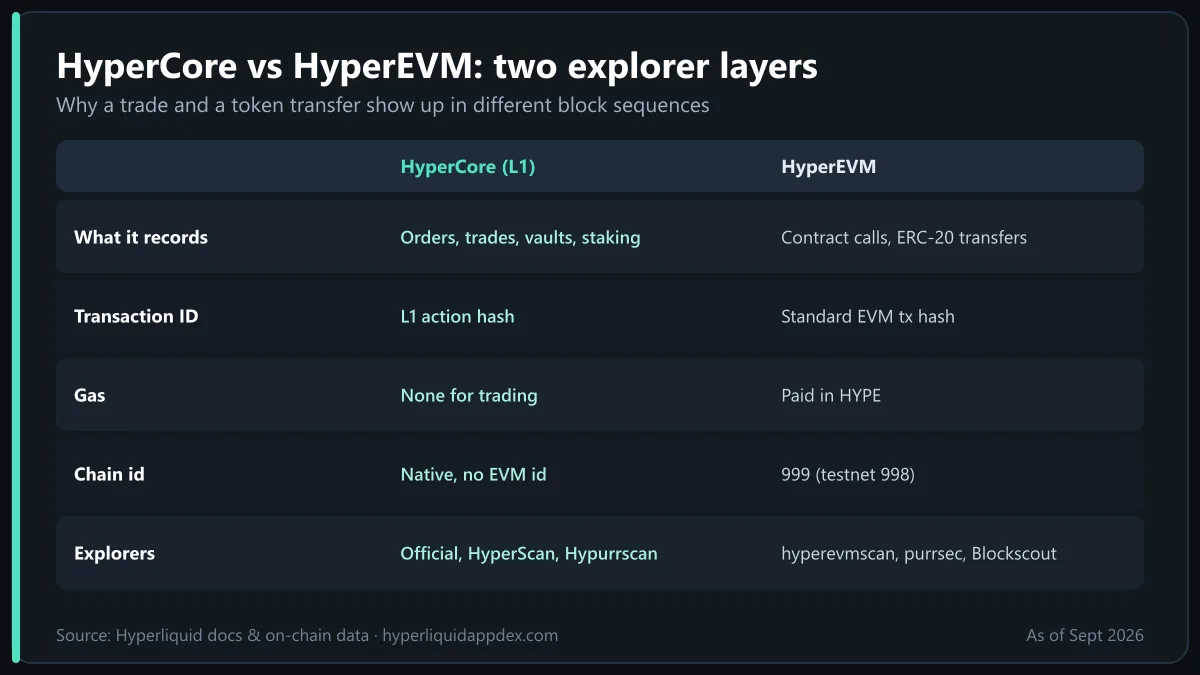
New users often paste a HyperCore block height into an EVM explorer (or vice versa) and conclude something is broken. Nothing is. The two environments keep separate counters:
| HyperCore (L1) | HyperEVM | |
|---|---|---|
| What it records | Orders, trades, transfers, vaults, staking | Smart-contract calls, ERC-20/NFT transfers |
| Block cadence | Sub-second, consensus-driven | Separate EVM block production |
| Transaction ID | L1 action hash | Standard EVM tx hash |
| Gas | None for trading | Paid in HYPE |
| Explorer | Official, HyperScan, Hypurrscan | hyperevmscan, purrsec, Blockscout-based |
| Chain id | n/a (native) | 999 (testnet 998) |
Both are secured by the same HyperBFT validator set, and state moves between them through precompiles (EVM reading HyperCore data) and system contracts (sending assets across). When you move USDC or HYPE from the trading side to the EVM side, you will see one event on a HyperCore explorer and a matching one on an EVM explorer, each with its own block number.
Hyperliquid analytics dashboards
Explorers answer "what happened to this address?". Analytics dashboards answer "what is happening across the market?". The useful ones as of September 2026:
| Dashboard | Best for | Notes |
|---|---|---|
| HyperDash | Whale positions, liquidation levels, per-asset positioning | The go-to Hyperliquid tracker for following large accounts |
| Official leaderboard | Trader PnL rankings by day, week, month, all time | app.hyperliquid.xyz/leaderboard |
| DefiLlama | TVL, perp volume, fees and revenue, HyperEVM protocol TVL | Cross-chain comparisons with other DEXs |
| Dune | Custom SQL dashboards: buybacks, HIP-1 auctions, vault flows, airdrop stats | Community-built, quality varies |
| Coinglass | Open interest, funding, liquidation heatmaps, whale tracker | Compare Hyperliquid with CEX perps |
| Hypurrscan / HyperScan | Token holders, auctions, validator stats | Explorer-level analytics |
For fundamentals such as revenue, volume and valuation multiples, DefiLlama and Dune are the sources we use in our revenue, volume and valuation analysis. For funding and open-interest signals before a trade, Coinglass and HyperDash are faster.
Comparison table: Hyperliquid explorers
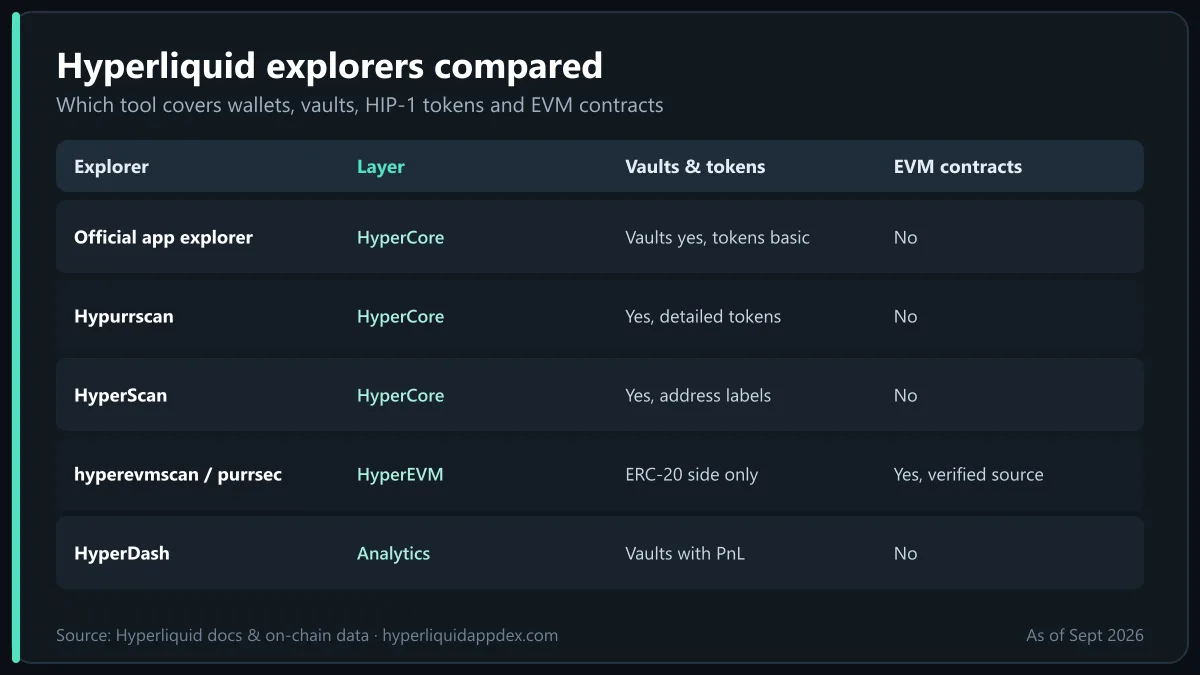
| Explorer | Layer | Wallets & positions | Vaults | HIP-1 tokens | EVM contracts | Labels & analytics |
|---|---|---|---|---|---|---|
| Official (app.hyperliquid.xyz/explorer) | HyperCore | Yes | Yes | Basic | No | Minimal |
| Hypurrscan | HyperCore | Yes | Yes | Detailed | No | Auctions, validators |
| HyperScan | HyperCore | Yes | Yes | Yes | No | Address labels, flows |
| hyperevmscan / purrsec / Blockscout | HyperEVM | EVM only | No | ERC-20 side only | Yes (verified source) | Approvals, contract labels |
| HyperDash | Both (analytics) | Yes, with PnL | Yes | No | No | Whale and liquidation views |
Security reminder: explorers are read-only and never need a wallet signature. If a site calling itself a "Hyperliquid explorer" asks you to connect and sign, close it. Legitimate lookups work with a pasted address alone. More on avoiding phishing in is Hyperliquid safe?.
Practical tips for using Hyperliquid explorers
- Verify a vault before depositing by checking its explorer page for leader address, age and drawdown history.
- Audit your own account monthly: use the funding and fees history to see what you actually paid; combine with our fees guide to decide whether staking HYPE for a discount makes sense.
- Check deposits that seem stuck on the Arbitrum side first (Arbiscan), then on a HyperCore explorer; bridge credits usually land in three to five minutes.
- Follow smart money responsibly: a position on an explorer tells you size and entry, not the trader's hedge elsewhere. Copy-trading from explorer data is a strategy with real risk.
- Use the API for anything repetitive: every explorer view maps to an
/inforequest, and building your own tracker is straightforward; see how to trade on Hyperliquid for the account basics and the API guide for endpoints.
Bottom line
There is no single Hyperliquid explorer because there is no single Hyperliquid layer: use the official explorer, HyperScan or Hypurrscan for HyperCore trading, vault and token data, and a Blockscout-style EVM explorer such as hyperevmscan for HyperEVM contracts. Wallet, transaction, vault and HIP-1 lookups take seconds once you know which layer you are on, and block numbers differ between layers by design. Layer HyperDash, DefiLlama, Dune and Coinglass on top for market-wide analytics. Everything here is read-only and free; the live data is at app.hyperliquid.xyz and the architecture is documented in the Hyperliquid docs.
Frequently Asked Questions
What is the official Hyperliquid explorer?
The official Hyperliquid explorer is built into the app at app.hyperliquid.xyz/explorer. It shows HyperCore blocks, transactions, addresses and vaults in real time, straight from the L1 state. For richer views of the same data, most users also keep a third-party explorer such as HyperScan or Hypurrscan open.
What is the difference between HyperScan and Hypurrscan?
Both are third-party explorers for HyperCore. Hypurrscan (hypurrscan.io) was the first community explorer and is known for wallet, position, HIP-1 token and vault pages. HyperScan (hyperscan.com) covers similar ground with its own dashboards and labelling. Which you prefer is largely a matter of layout; many traders use both.
Is there a block explorer for HyperEVM?
Yes. HyperEVM (chain id 999) has Blockscout-style explorers, with hyperevmscan and purrsec among the names in use, that show EVM blocks, contracts, token transfers and verified source code. HyperCore explorers do not show EVM contract calls, so you need an EVM explorer for smart-contract activity.
How do I look up a wallet on Hyperliquid?
Paste the 0x address into the search box of the official explorer, HyperScan or Hypurrscan. You will see perp positions, spot balances, open orders, trade history, vault deposits, staking and transfers. The same address also works on a HyperEVM explorer for any smart-contract activity on the EVM side.
Why do HyperCore and HyperEVM show different block numbers?
HyperCore produces its own fast L1 blocks for order-book and account activity, while HyperEVM blocks are produced on a separate cadence and share state with HyperCore through precompiles and system contracts. A perp trade therefore appears in a HyperCore block, and an ERC-20 transfer appears in an EVM block, with different numbering.
What are the best Hyperliquid analytics dashboards?
For whale and position tracking, HyperDash and Hypurrscan; for TVL, volume and fees, DefiLlama; for custom on-chain queries, Dune dashboards; for liquidations, open interest and funding across exchanges, Coinglass. The official leaderboard at app.hyperliquid.xyz/leaderboard ranks trader PnL.

Trading on Hyperliquid since the 2024 points seasons. Follow on X · LinkedIn · YouTube
Ready to trade on the Hyperliquid app?
Open the official Hyperliquid DEX with our referral link and get a lifetime 4% discount on trading fees. No KYC, no gas fees, self-custody.
Open Hyperliquid App · Save 4%Disclaimer: This article is for educational purposes only and is not financial, investment or legal advice. Perpetual futures trading with leverage carries a high risk of loss. Read our full disclaimer.